Body
Issue/Question
Can I use Claude with Copilot? How?
Environment
- Copilot
- Claude
- AI
- Claude Opus 4.6
Cause
Customers in some cases prefer Claude over ChatGPT in Copilot
Resolution
- To use Claude in the Researcher agent, sign into the Microsoft 365 Copilot app
Note: a co-pilot license is needed to use this function in USD's environment, please see Requesting M365 Copilot License for more details
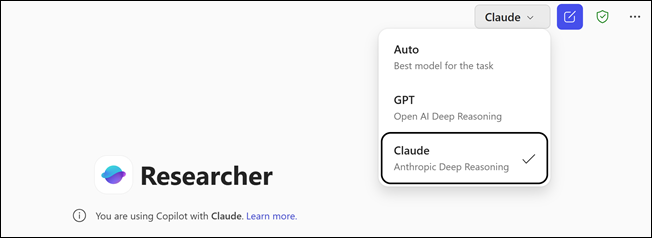
- Select Researcher under Agents in Chat
- In the upper right hand corner, select Claude
Note: it is normally pre-set to Auto
- For more tips on using the Researcher agent, see Get started with Researcher
Note: Claude is available for use during an active session. Once the session ends or the Copilot app is closed, the system automatically reverts to the default Generative AI Model for Microsoft 365